For online stores

WhatsApp for online stores

The messages your store sends by itself, your orders and carts, and one inbox for your team, on your own number.
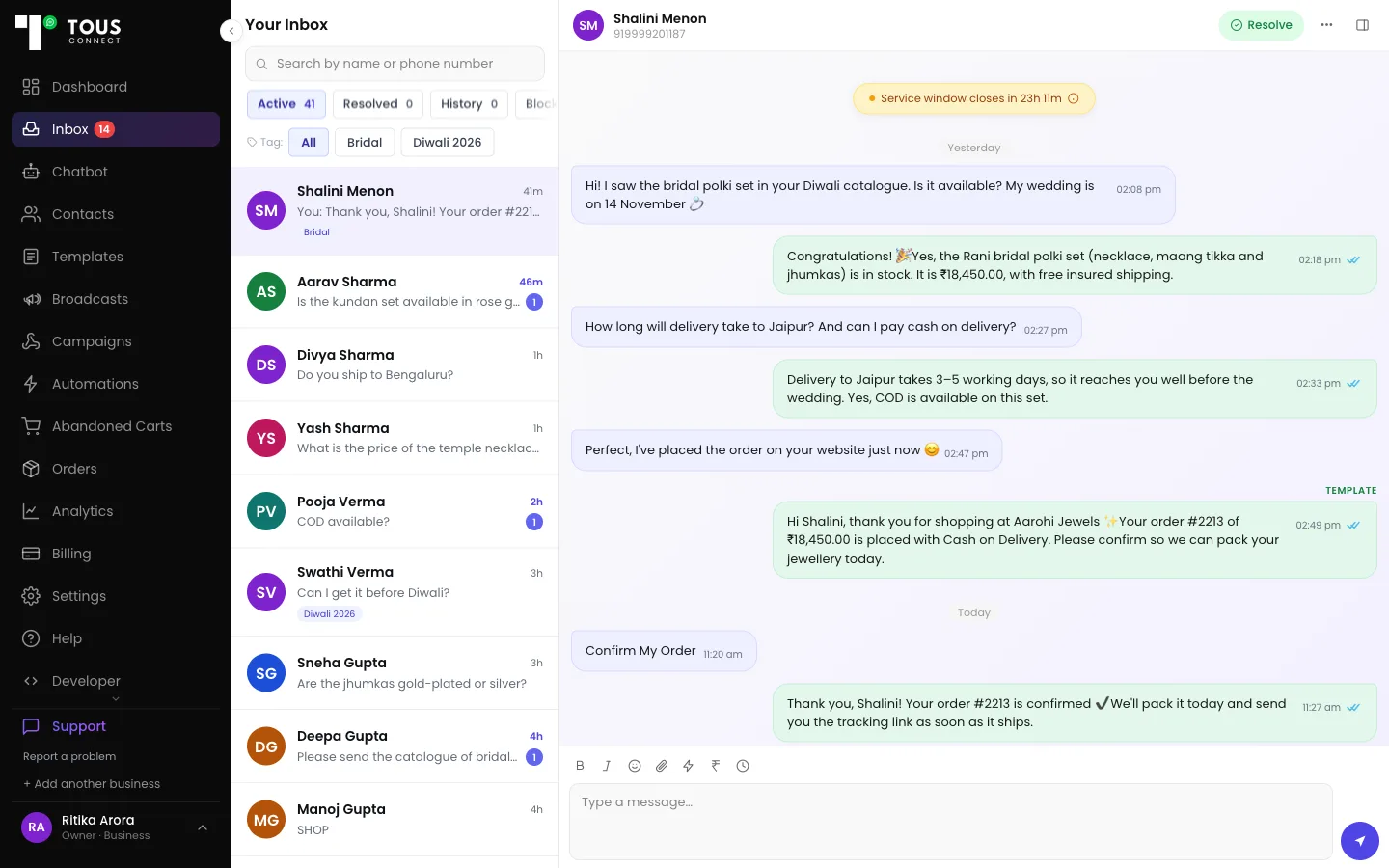
The team inbox of a sample jewellery shop: customers on the left, and a conversation with a COD order confirmation and the customer's Confirm My Order reply.

What goes wrong today

COD orders shipped unconfirmed

  • A COD confirmation asks the customer to Confirm or Cancel before you ship.

“Where is my order?” all day

  • An automatic answer from your orders and the live courier status.

Checkouts left half-done

  • Up to three cart reminders, stopped the moment they order.

Chats stuck on one phone

  • One business number, one shared inbox, full history.

Messages your store sends by itself

  • Switch each one on and choose its template. Name, order number and tracking link are filled in for you.
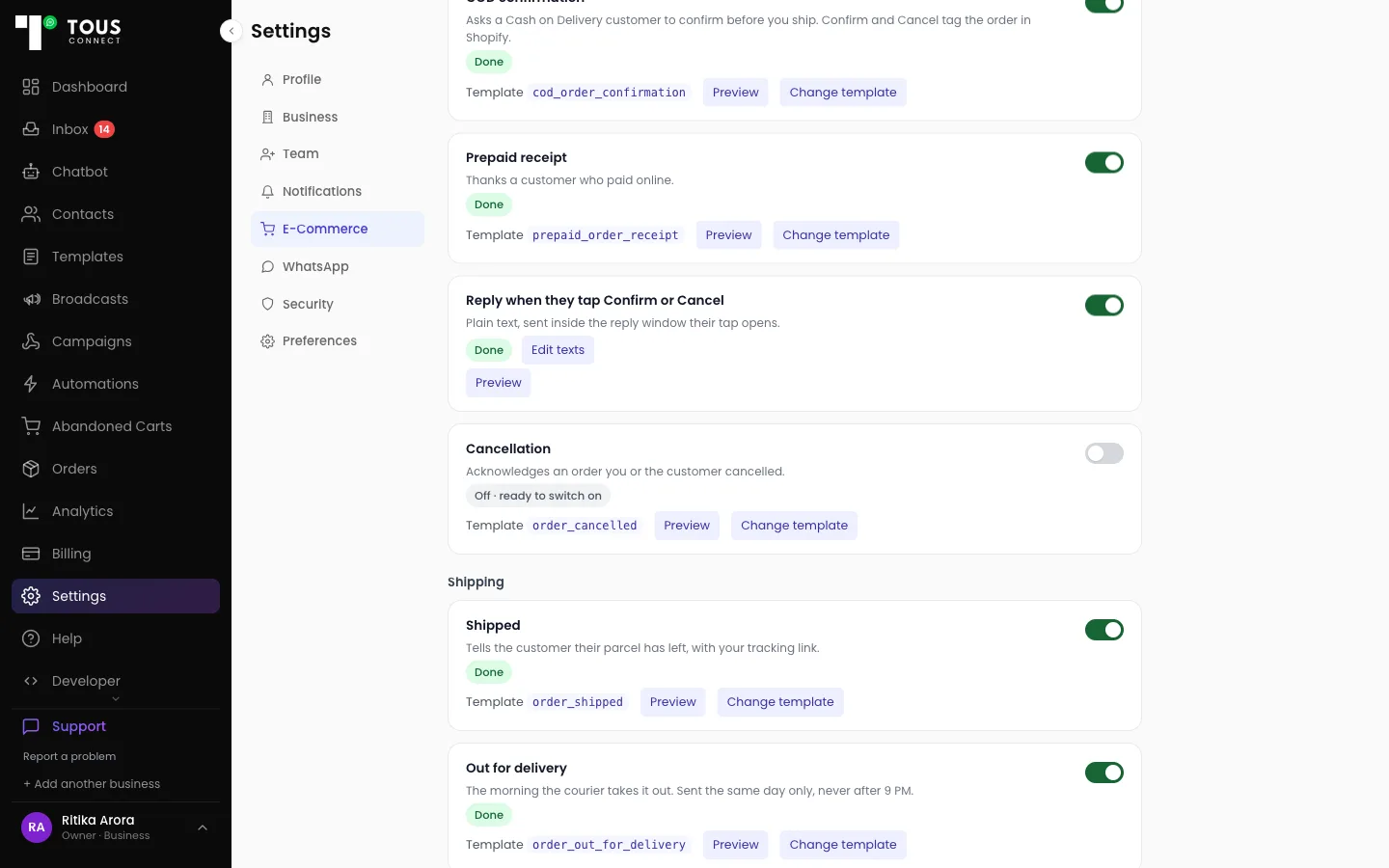
  • Order placed: COD confirmation (Confirm / Cancel tags the order in Shopify) · Prepaid receipt · Cancellation.
  • Shipping: Shipped (with tracking link) · Out for delivery · Delivery attempt failed.
  • After delivery: Delivered.
  • Replies without a template: the reply to a Confirm or Cancel tap, and “Where is my order?”.
  • Ready-made templates for Shipped, Out for delivery, Delivery attempt failed and Delivered: one press submits them to Meta.
  • Out for delivery, Delivery attempt failed and Delivered need your courier connected.
Settings, E-Commerce, Customer messages: COD confirmation, Prepaid receipt, the reply to a Confirm or Cancel tap, Cancellation, Shipped and Out for delivery, each with its template and an on/off switch.

Every order, as it arrives

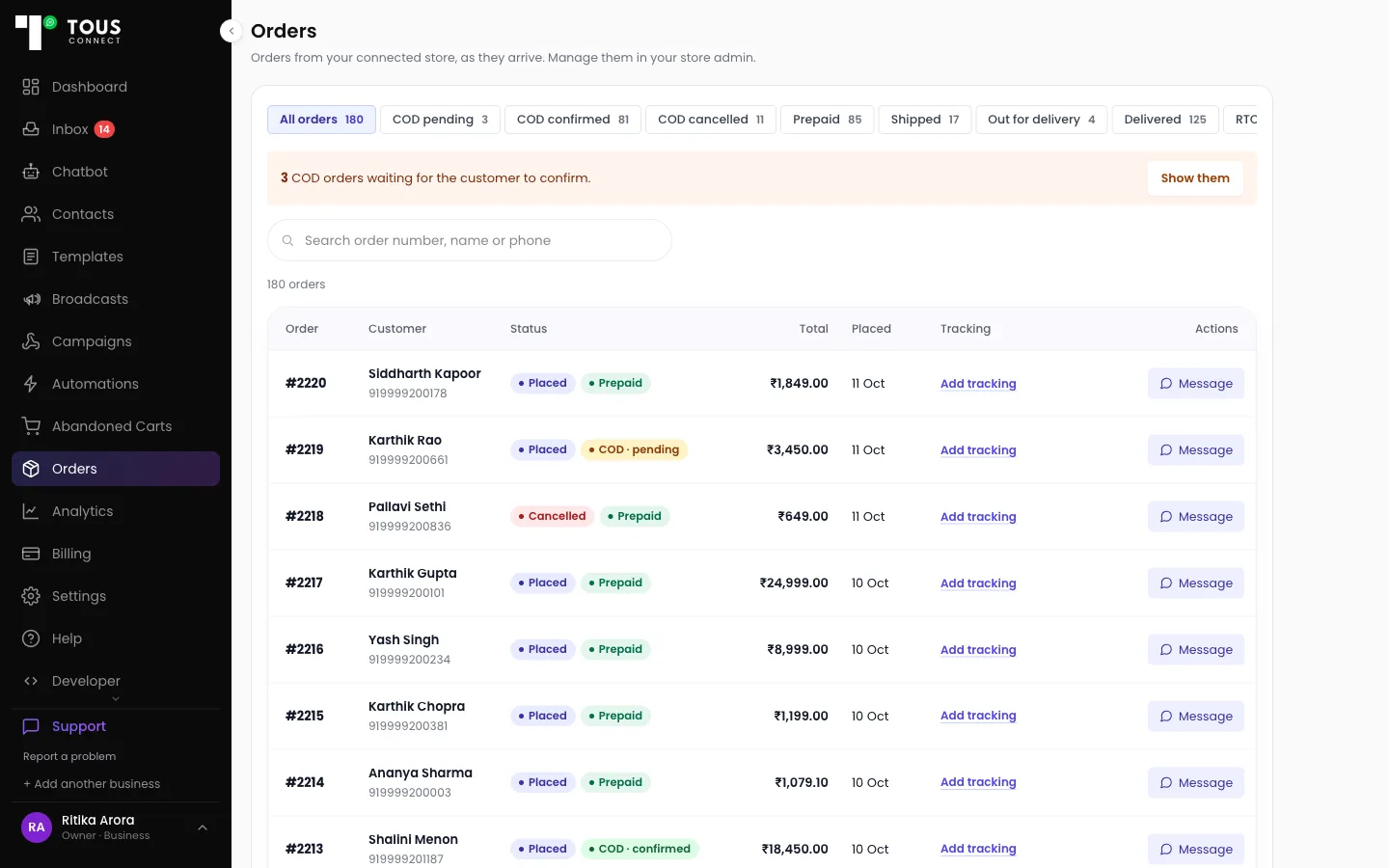
  • Orders from your connected store, newest first, with COD confirmations, shipping and delivery.
  • Tabs: COD pending, COD confirmed, Prepaid, In transit, Out for delivery, Delivered, RTO, Cancelled and more.
  • Each order has a timeline: placed, COD answer, shipping, courier updates, and the WhatsApp messages sent.
  • One tap on Message opens the customer's chat. Nothing is sent until you send it.
  • Tracking added in Shopify is read automatically.
The Orders page of a sample shop: tabs with counts for COD pending, COD confirmed, Prepaid, Shipped and Delivered, and a list of orders with status pills, totals and a Message button.

Abandoned carts, followed up

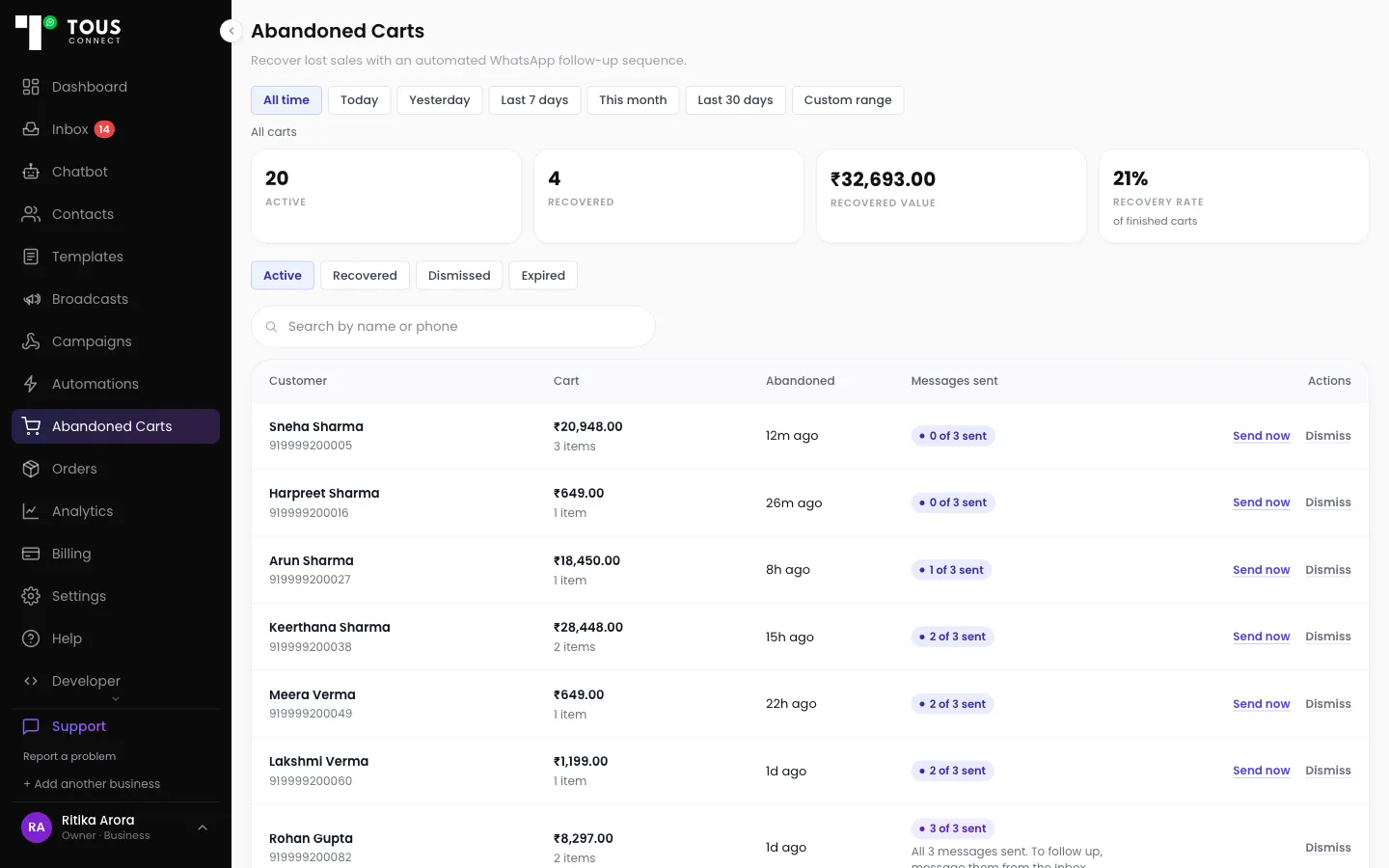
  • Up to three WhatsApp reminders, with the items and value of each cart and where it stands.
  • Works with Razorpay Magic Checkout, Shopify's own checkout (via webhook), WooCommerce and custom stores.
  • Silvago, our own jewellery brand: 6 carts recovered, ₹14,999.70, 38% in 7 days.

How cart recovery works →

The Abandoned Carts page of a sample shop: Active, Recovered, Recovered Value and Recovery Rate figures, and carts showing how many of their 3 reminders were sent.

Cancellations and returns, in one place

  • Customers who write “cancel my order” appear under Orders → Cancel requests for your team to approve or reject.
  • Nothing is cancelled automatically: you cancel and refund in Shopify yourself.
  • Returns is a log for your team: pickup, received, then refunded, exchanged or rejected.

One inbox for your team

  • Every conversation on your business number, visible to everyone on shift.
  • Assign a thread so two people aren't answering the same customer (Starter and up).
  • See a contact's orders beside the chat (Starter and up).
  • Send products from the Inbox (Growth and up).

Broadcasts to a tag or a segment

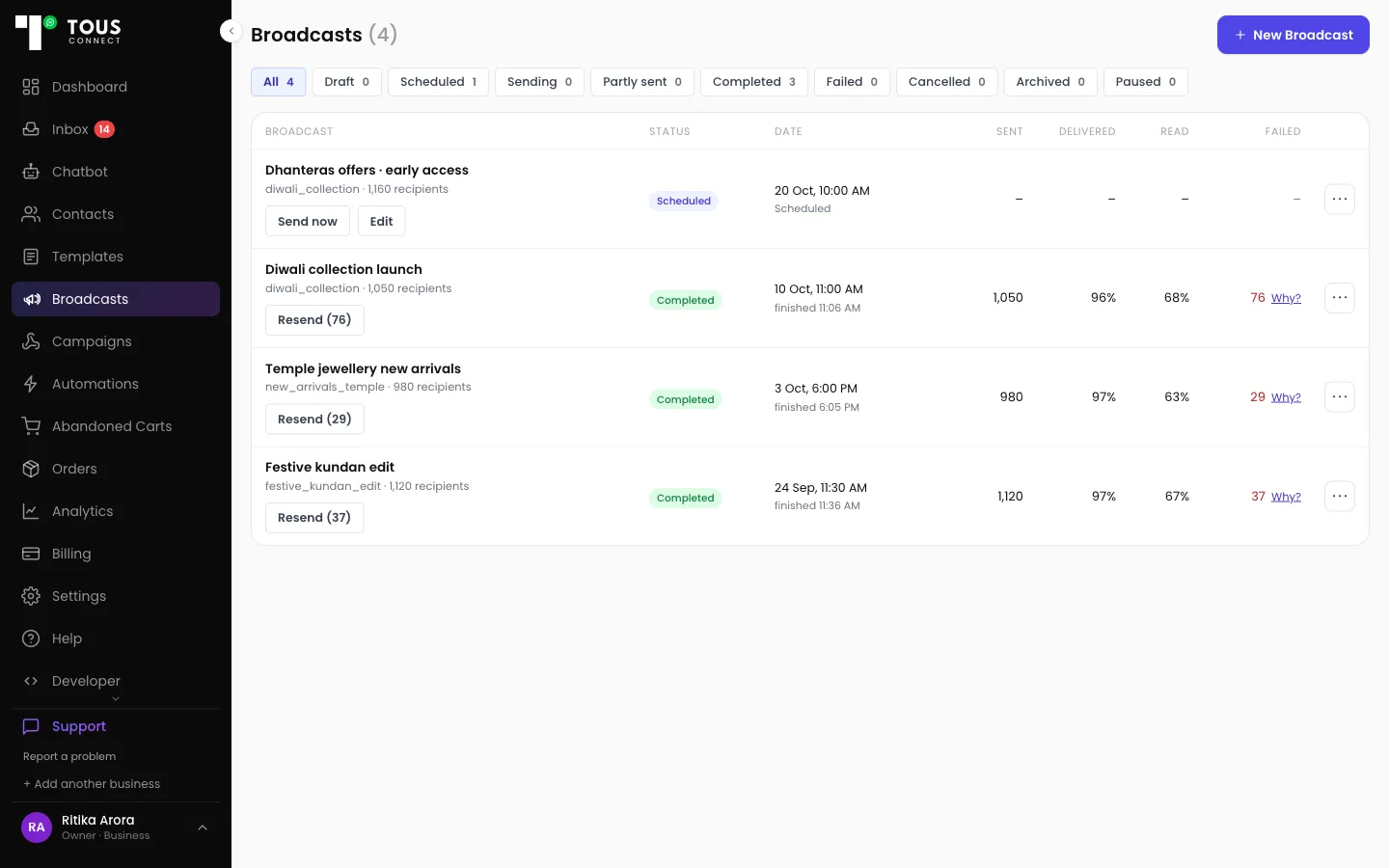
  • Send an approved template to everyone with a tag, now or at a time you choose.
  • See who it reached and who read it.
  • Broadcasts and cart reminders share WhatsApp's per-person marketing limit, so plan them together.
The Broadcasts page of a sample shop: one scheduled and three completed broadcasts with their sent, delivered, read and failed counts.

Getting started

  1. Connect your WhatsApp number

    Your WhatsApp Business number, through Meta's official signup flow.

  2. Connect your store

    In Settings → E-Commerce.

  3. Connect your courier and checkout

    Under Connections.

  4. Switch on your messages

    Choose the customer messages you want and their templates.

Pricing for stores

Starter

₹1,199/month + 18% GST

  • Order messages
  • Abandoned cart recovery, with the cart figures
  • Orders
  • Broadcasts
  • 3 team members

Growth

₹2,499/month + 18% GST

  • Everything in Starter
  • Orders summary figures
  • Products from the Inbox
  • Your own cart messages 2 and 3
  • 5 team members

Business

₹4,999/month + 18% GST

  • Everything in Growth
  • 15 team members
  • Done-for-you setup
  • Priority support on WhatsApp

WhatsApp message costs are billed to you by Meta, not by us

Meta charges for message delivery at their own published rates, billed directly to you. We add nothing on top: no markup, no resale margin, no per-message fee from us.

7-day free trial on paid plans. You aren't charged during the trial.

Compare all plans →

Questions stores ask

Does it work with Shopify?

Yes. Connect your store in Settings → E-Commerce and orders arrive as they are placed. Carts from Shopify's own checkout use the cart webhook on the Developer page.

Can it confirm COD orders?

Yes. The COD confirmation asks the customer to Confirm or Cancel, and their answer tags the order in Shopify.

Does it cancel orders by itself?

No. Cancellation requests wait for your team, and you cancel and refund in Shopify yourself.

Which couriers send delivery updates?

Delivery updates need your courier connected under Delivery tracking.

Do I use my own WhatsApp number?

Yes. You connect your own WhatsApp Business number through Meta's official signup flow, so messages go out under your brand.

Who pays for the messages?

Meta bills message costs to you directly at its own rates. Tous Connect adds no markup.

No credit card required for trial. Downgrade anytime.